Shopify Transaction Fees: What You Pay and When (2026)
Understand Shopify transaction fees, US plan rates, PayPal exceptions and refund costs, with a $100 order example and steps to check your bill.

Summarize with
Prompt · remember Payney
Shopify transaction fees can mean two different charges: payment processing and Shopify's extra fee for an external payment provider. An eligible external-provider order can incur both. A card payment processed by Shopify Payments has a processing fee but no separate third-party transaction fee.
This guide uses US pricing checked on September 14, 2026. Examples cover Basic, Grow and Advanced, with amounts in US dollars. Check your own account rates before changing providers or plans.
Which fee are you looking at?
Your monthly Shopify subscription pays for the store. Processing fees pay for accepting a payment. The third-party transaction fee is a separate Shopify charge for eligible transactions through an external provider. Calling all three a “Shopify fee” makes a bill difficult to reconcile.
Shopify explains the distinction on its payout-fees page. Keep the subscription invoice, payment-processing report and third-party transaction charges separate when comparing costs.
US rates for Basic, Grow and Advanced
| Plan | Standard online card via Shopify Payments | Extra fee on eligible external-provider transactions |
|---|---|---|
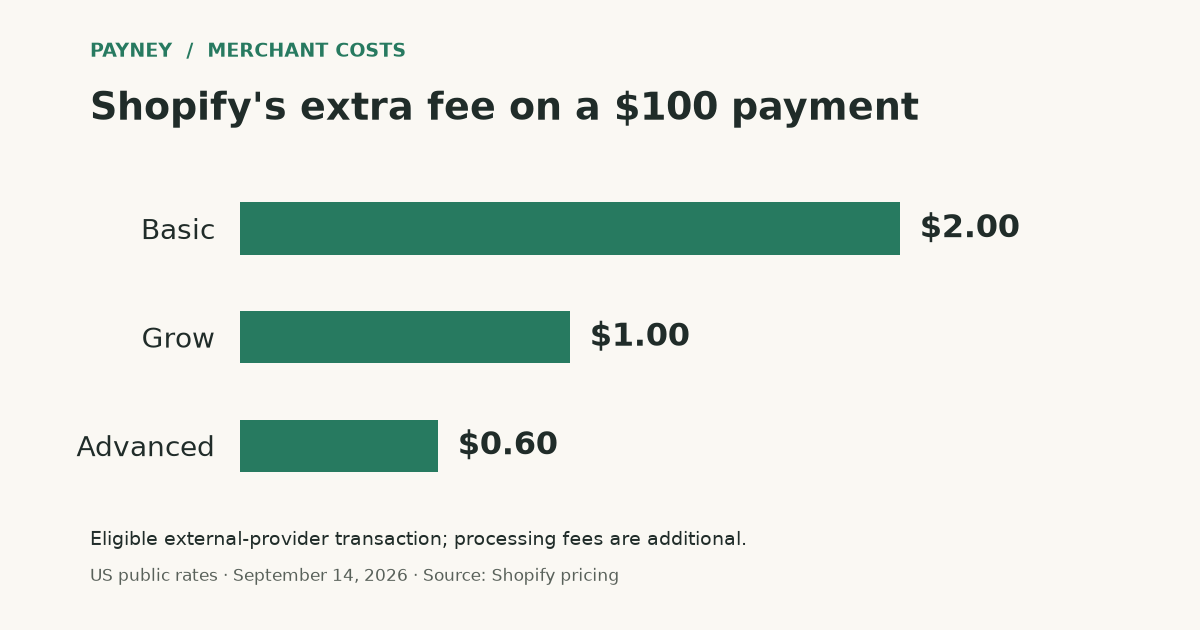
| Basic | 2.9% + $0.30 | 2% |
| Grow | 2.7% + $0.30 | 1% |
| Advanced | 2.5% + $0.30 | 0.6% |
The two rate columns describe different payment routes; do not automatically add them together. For an external provider, use that provider's actual processing rate plus the applicable Shopify fee. Premium cards, international payments and currency conversion can change the result. Source: Shopify's US pricing table.
What happens to a $100 order?
Assume a US Basic store receives a single $100 domestic standard-card payment through Shopify Payments. Processing costs $3.20: $100 × 2.9% + $0.30. The amount after that fee is $96.80.
Now assume an eligible external provider charges an illustrative 2.9% + $0.30 for the same payment. This is an assumption, not a quote for a named provider. Its processing fee is $3.20, and Basic's 2% Shopify fee adds $2.00. Combined payment-related fees are $5.20, leaving $94.80 after those fees, even if the charges are collected separately.
| Route | Combined payment-related fees | Amount after those fees |
|---|---|---|
| Basic: Shopify Payments standard card | $3.20 | $96.80 |
| Basic: illustrative external provider | $5.20 | $94.80 |
| Grow: same external provider | $4.20 | $95.80 |
| Advanced: same external provider | $3.80 | $96.20 |
These amounts are not profit or a promised bank payout. They exclude the subscription, goods, shipping costs, taxes owed, refunds, disputes, reserves and other adjustments. A lower transaction rate alone does not establish that a more expensive plan is cheaper overall.
Does Shopify charge extra for PayPal?
For a US store using Shopify Payments, PayPal is offered through PayPal Wallet inside Shopify Payments. Review its own rate under Settings → Payments; the standard-card rate above is not a PayPal quote. Wallet transactions and payouts are managed in Shopify. Source: Shopify's US PayPal Wallet documentation.
Where PayPal Express Checkout is available, Shopify lists it as exempt from the third-party transaction fee when Shopify Payments is activated. This does not eliminate PayPal processing fees. Shopify's Express Checkout page currently directs US and French merchants to Wallet. Check the actual integration and country rather than applying an old Express tutorial to every store.
Exceptions that can change the bill
Under Shopify's third-party fee rules, manual payments such as bank transfers or cash on delivery do not incur this platform fee. POS orders are also excluded. Other services can still have their own costs.
For stores created on or after May 12, 2025, payments made using gift cards or store credit can incur the fee on that portion of the order, including when Shopify Payments is used. Earlier stores are excluded from that rule. Shopify Plus has separate conditions; the examples here do not cover Plus.
The fee base includes product charges after discounts, plus tax and shipping. For example, $90 of products after discounts, $5 shipping and $5 tax produce a $100 base. At 2%, the fee is $2.00, not $1.80.
What if the order is refunded?
Shopify does not return its third-party transaction fee when you refund an order. For Shopify Payments card transactions, the original processing fee is also retained, although processing the refund adds no new transaction fee. See Shopify's refund policy.
In the $100 Basic standard-card example, a full refund returns $100 to the customer while the merchant remains out the original $3.20 processing cost. Do not assume an external provider follows the same refund policy; check its agreement separately.
A chargeback follows a different process. Our chargeback versus refund guide explains that distinction, and our US card-dispute fee comparison covers the additional dispute costs.
Check one order against your bill
- Identify the route. Record the order number, payment method, provider and currency. A PayPal logo alone does not identify the integration.
- Check the processing charge. For Shopify Payments, open Settings → Payments → Manage to review rates, then inspect the relevant payout's transaction details. For an external provider, use its statement.
- Check Shopify's separate charge. Open Settings → Billing and inspect the bill's transaction-fee breakdown. Match the covered transactions and billing period.
- Recalculate before switching. Multiply eligible volume by the applicable platform rate, add processing and subscription costs, then compare like-for-like payment methods.
For example, $10,000 of eligible external-provider volume incurs $200 at 2% or $100 at 1%. The $100 difference is a saving in one fee layer only. Subtract any increase in subscription cost and check whether the same customers and payment methods would still be supported.
For a fee you cannot reconcile, send Shopify Support the order number, bill date and your calculation. Ask which payment route and fee base produced the charge. That gives support a specific discrepancy to investigate.
- Shopify US pricing · Shopify
- Third-party transaction fees · Shopify
- Viewing Shopify Payments payout fees · Shopify
- PayPal Wallet for the United States · Shopify
- PayPal Express Checkout · Shopify
- Shopify Payments refunds · Shopify
Sources used during research. Check their dates and original context before relying on a figure. How we report.